






A stylish name shows boxes when a device has no font for one of its characters, question marks when the text passed through a system that could not store a character, and gaps when an app or game removes characters it does not allow. The symptoms overlap, so a box alone does not tell you which one happened.
The fix starts with finding out where the name breaks: on your screen, in the copy, in the game's checks, or on someone else's phone. A plain baseline makes that easy, so generate a simpler name to test next to your decorated one, then follow the check below.
The Quick Check: Find Where Your Name Breaks
Work through these steps in order, and stop at the first step where the name goes wrong. That step points to the cause.
- Start with plain text. Type the name in ordinary letters, such as Nova, in the same place. Plain text that fails as well points to the field or the game, not the styling.
- Paste into a simple text field. Paste the styled name into a notes app or a chat with yourself. Boxes there mean your own device lacks a font for a character.
- Look on a second device. Send the name to a friend or open it on another phone or computer. Boxes only there mean their device lacks the font.
- Remove decorations one at a time. Delete one symbol, paste again, and repeat. The character whose removal fixes the name is the one causing it.
- Inspect the characters. Paste the name into the Name Checker to list every character, hidden ones included, with notes on which ones often show as boxes.
- Check the game's own rules. A name that shows on every device and still gets refused contains a character the game does not allow. Its support pages or rename screen are the authority there.
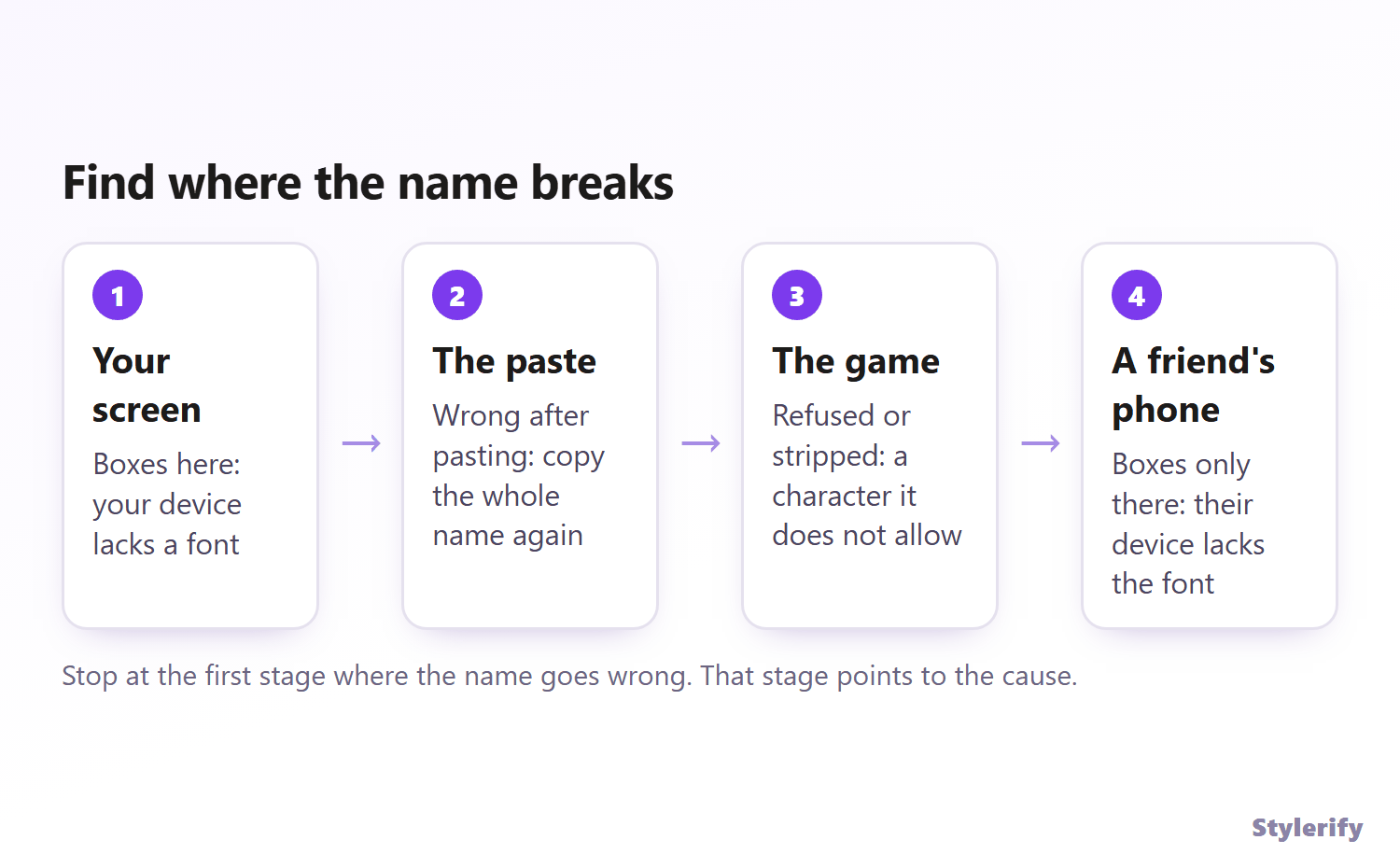
None of these steps proves a game will accept a name. A text field only shows what a device can draw; the game's server makes its own decision when you confirm.
Characters, Code Points and Fonts in Plain Words
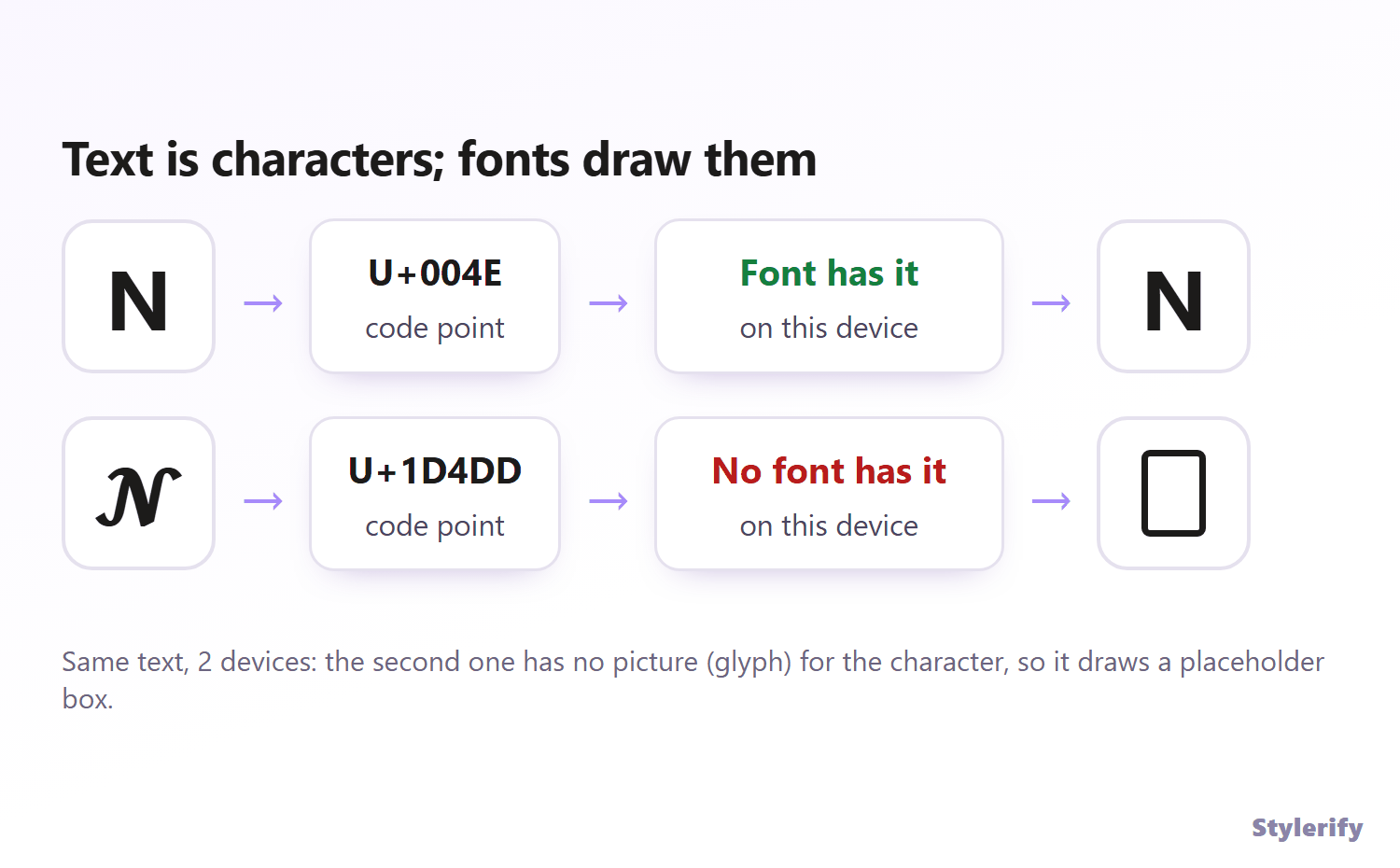
Every piece of text is a row of characters, and Unicode gives each character a number called a code point. A font holds the pictures, called glyphs, that draw those characters. The Unicode Consortium puts it plainly: Unicode is not a font, and to display a character you need a font containing a glyph for it.
Fancy text is not a font applied to normal letters. It is a different set of characters that happen to look like letters. These 4 names look alike and are 4 different strings:
| Shown as | What it is | First code point | Where it comes from |
|---|---|---|---|
| Nova | Ordinary Latin letters | U+004E (N) | Every font |
| Nova | Full-width letters | U+FF2E | Fonts made for Chinese, Japanese and Korean text |
| ɴᴏᴠᴀ | Small capital letters | U+0274 | Phonetic letters used by linguists |
| 𝓝𝓸𝓿𝓪 | Mathematical bold script letters | U+1D4DD | Symbols made for maths notation |
Boxes in that table on your own screen prove the point: the words in the "What it is" column still tell you what each row holds. The Unicode Standard says the mathematical letters are meant for maths and technical notation, not for styling ordinary text, which is why support for them varies so much outside maths apps.
Sources: Unicode Glossary; Unicode font questions; Unicode Standard, chapter 22.
Symptom, Cause and Fix
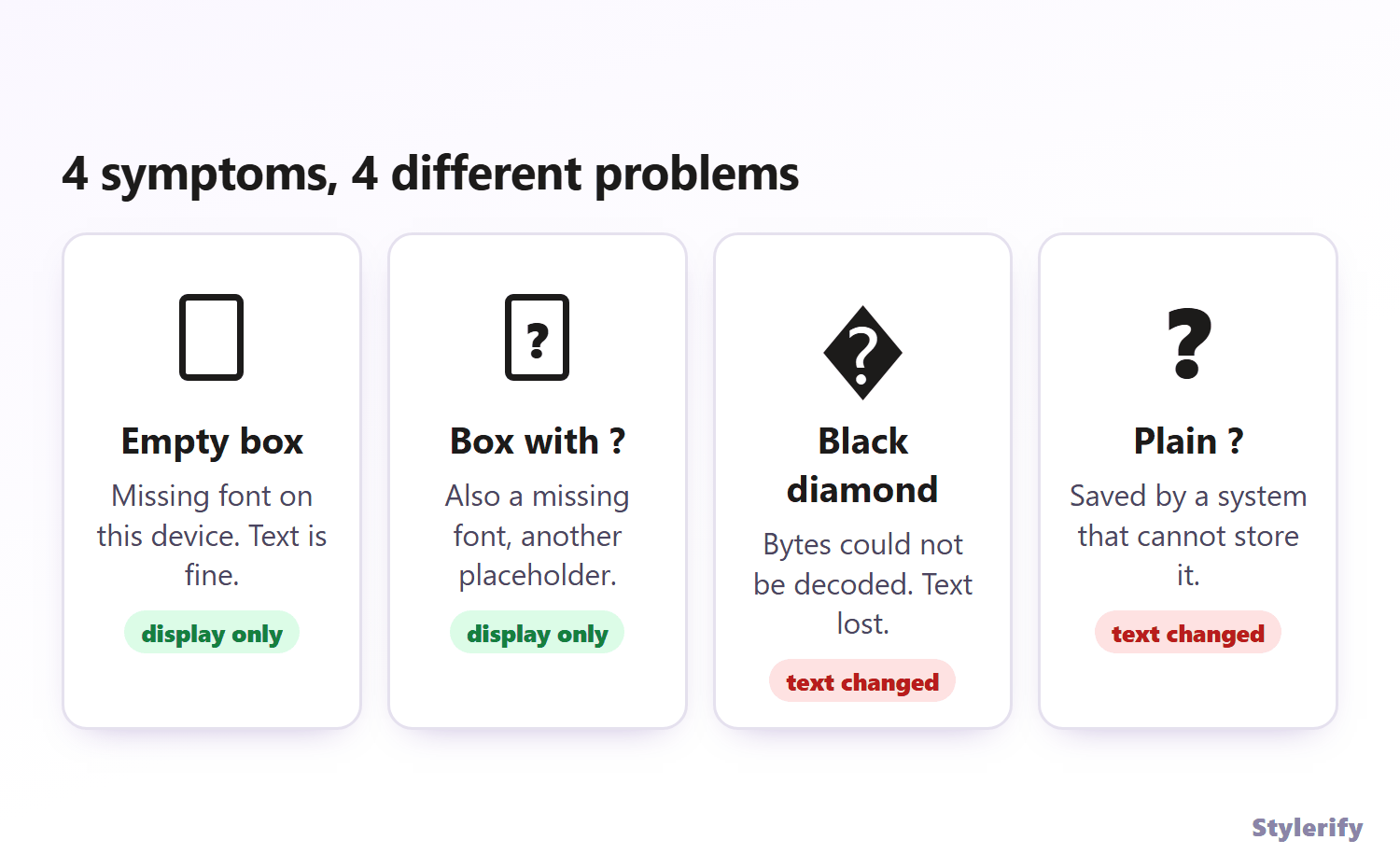
Match what you see to the closest row. Several rows can share a symptom, so the "how to tell" column matters.
| What you see | Likely cause | How to tell | Fix |
|---|---|---|---|
| Empty box □ | Missing glyph: no font on this device draws the character | Other devices show it fine | Swap that character for a common one such as ✦ or ★ |
| Box with ? or X inside | A missing glyph too, drawn with a different placeholder | Same as above; the text itself is intact | Same as above |
| Black diamond � | Text that could not be decoded; the original character is lost | It appears in the saved copy, not only on one phone | Retype or paste the name again from the source |
| Plain ? | The text went through a system that could not store the character | It appears after saving, on every device | Use characters the app keeps, or plain letters |
| Symbol gone after saving | The app removed a character it does not allow | The preview showed it, the saved name lacks it | Choose a symbol the app keeps; test one at a time |
| Styled letters turn plain | The app converted look-alike letters to ordinary ones | 𝐀𝐥𝐞𝐱 saves as Alex | Use symbols around plain letters instead |
| One letter plain or boxed in a styled word | That style has a gap for the letter | Only one letter misbehaves, in every app | Pick another style for that name |
| "Too long" for a short name | The app counts styled letters as 2 places | Plain letters of the same length fit | Shorten it, or use small caps, which count as 1 |
Why Stylish Names Show Boxes
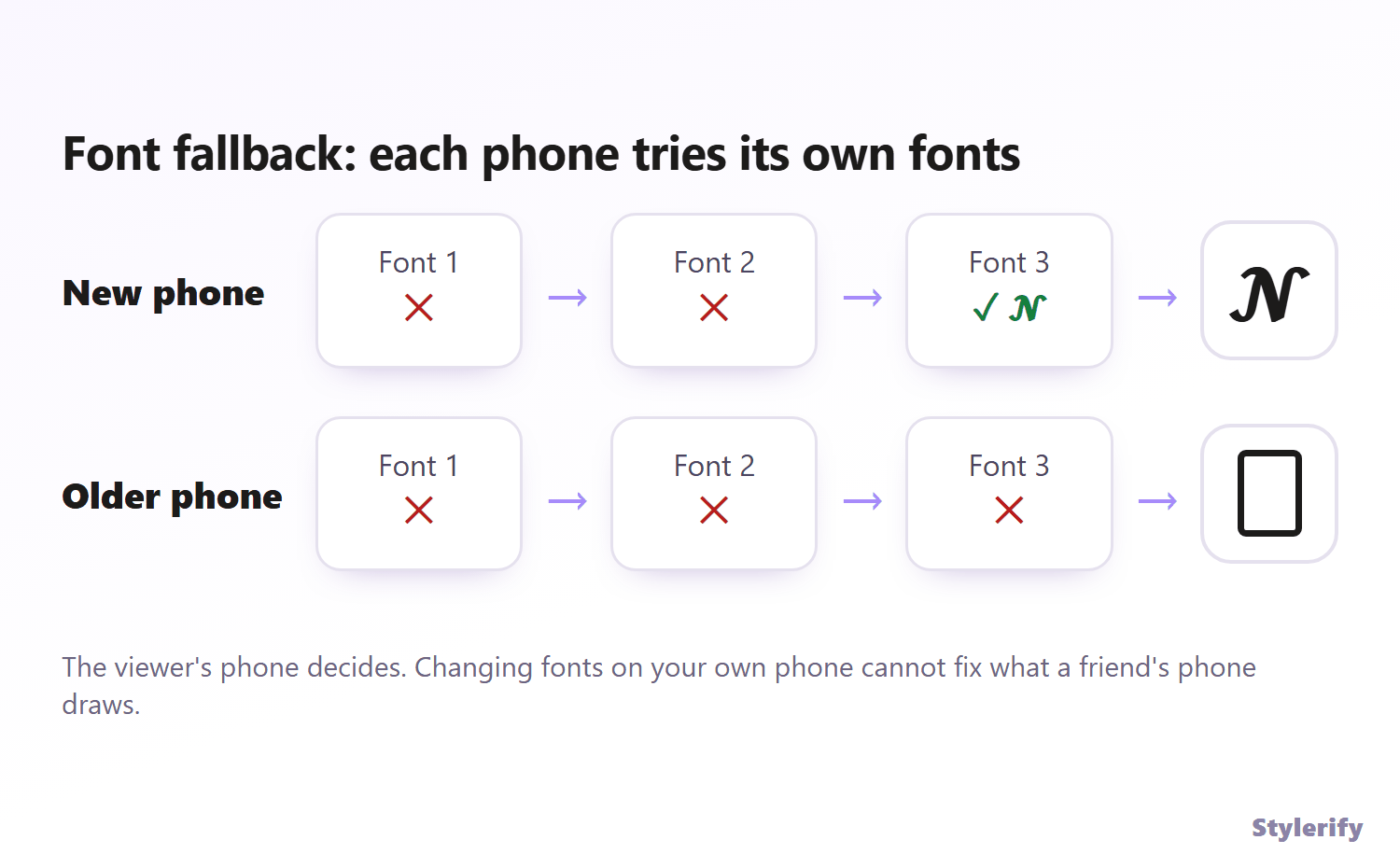
Boxes appear when a device has no font with a glyph for a character. Phones and computers try fonts one after another for each character, a process called fallback. When every font in the chain lacks a glyph, the system draws a placeholder. Fonts set this placeholder, called .notdef, and Microsoft's font specification recommends an empty rectangle, a rectangle with a question mark inside, or one with an X. People call it tofu.
That explains the most confusing case: your name looks fine to you and shows boxes to a friend. Your device found a font for every character; theirs did not. The viewer's device decides, and nothing you do on your phone changes what their phone can draw. Android's documentation notes that new emoji show as tofu on older phones, and that Android 11 and lower cannot update the emoji font. Rare symbols such as ꧁ ꧂ and 𓆩 behave the same way on older devices.
Sources: OpenType recommendations (.notdef); Android emoji compatibility.
Why Stylish Names Show Question Marks
A question mark has 2 meanings, and only one of them is a font problem. A box with a question mark inside is the missing-glyph placeholder described above, and the text is fine. A plain ? or a black diamond � means the text itself changed.
The black diamond is the Unicode replacement character, U+FFFD. Unicode uses it as a stand-in for a character that could not be interpreted, for example when bytes were damaged or decoded with the wrong encoding. A plain ? usually comes from conversion to an older character set: Microsoft's documentation on character encoding says a character that has no match in the target encoding is replaced by a single question mark by default, and the information is lost.
Servers can cause this too. A database set up for older storage rules may hold only part of Unicode; MySQL's older utf8mb3 setting, for example, stores no supplementary characters, and the mathematical letters such as 𝓝𝓸𝓿𝓪 are supplementary. A name that looked right while you typed can then come back as ????. That is a server choice, so the fix on your side is a name built from characters the app keeps.
Sources: Unicode Standard, U+FFFD; Microsoft, character encoding; MySQL utf8mb3.
Why Symbols Disappear or Change After Saving
Symbols disappear after saving when the app cleans the name before storing it. Apps do this to stop look-alike names, invisible names and broken text. 4 kinds of cleaning cause most vanished characters:
- Allowed-character lists. Many games accept only letters, numbers and a few marks in a name and strip or refuse the rest.
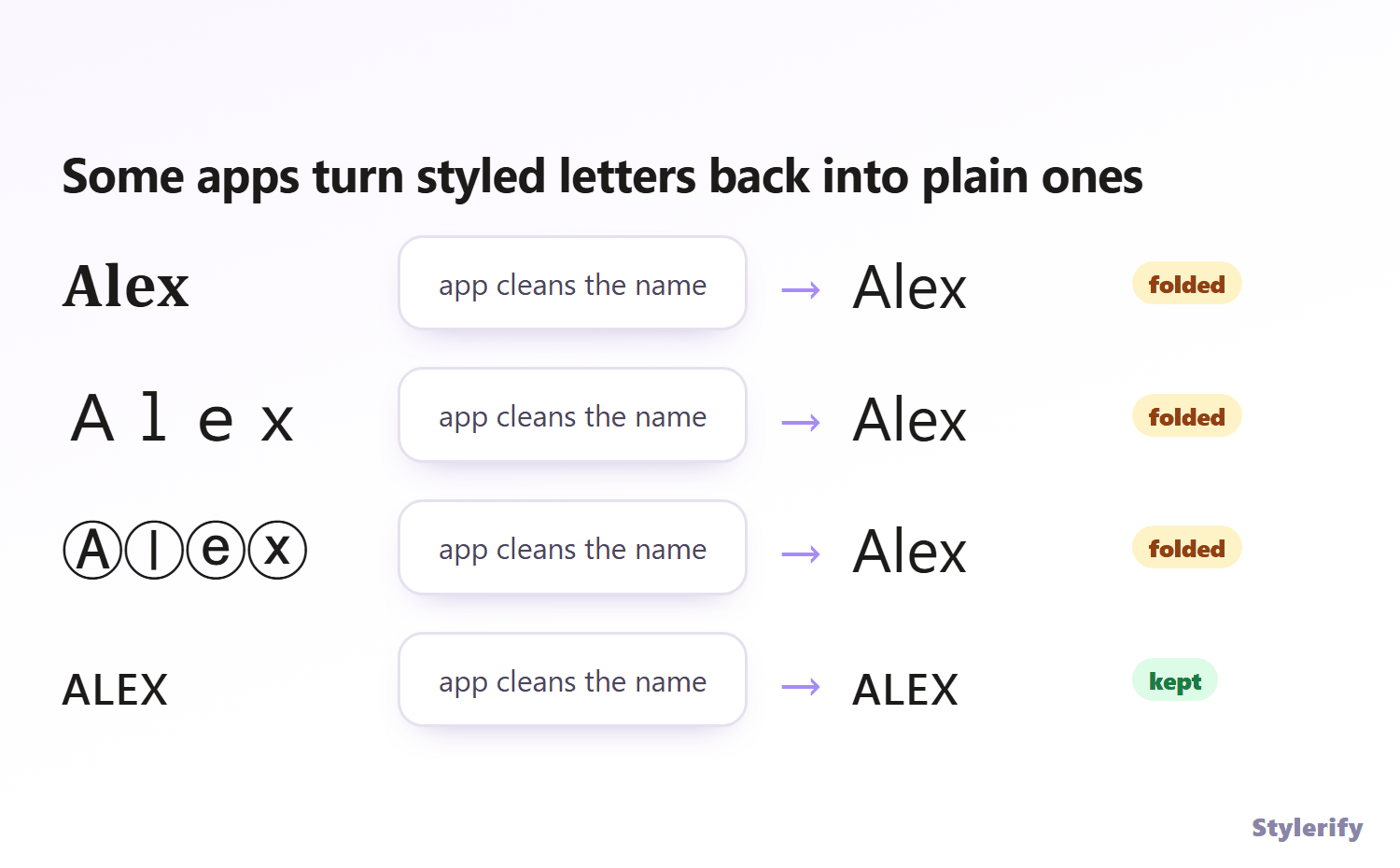
- Normalization. Unicode's compatibility normalization (NFKC) turns look-alike letters into ordinary ones: 𝐀𝐥𝐞𝐱, Alex and Ⓐⓛⓔⓧ all become Alex. Unicode recommends NFKC for identifiers, so some apps run it on usernames. Small caps such as ɴᴏᴠᴀ are not folded this way.
- Invisible characters. Characters such as the Hangul filler (U+3164), used for "blank names", are marked as ignorable in Unicode's own data, so apps often drop them or draw nothing.
- Stacked marks. Glitch text piles combining marks on each letter. Unicode treats very long stacks as meaningless in practice, and many apps trim them.
One more case looks like a vanished letter and is not. A few letters have no slot in the mathematical blocks: the italic h, for example, lives elsewhere in Unicode as ℎ. A careless generator that shifts every letter by the same amount lands in an empty slot and produces a box for that single letter.
Sources: Unicode Normalization Forms (UAX #15); Unicode normalization questions.
Why a Short Name Counts as Too Long
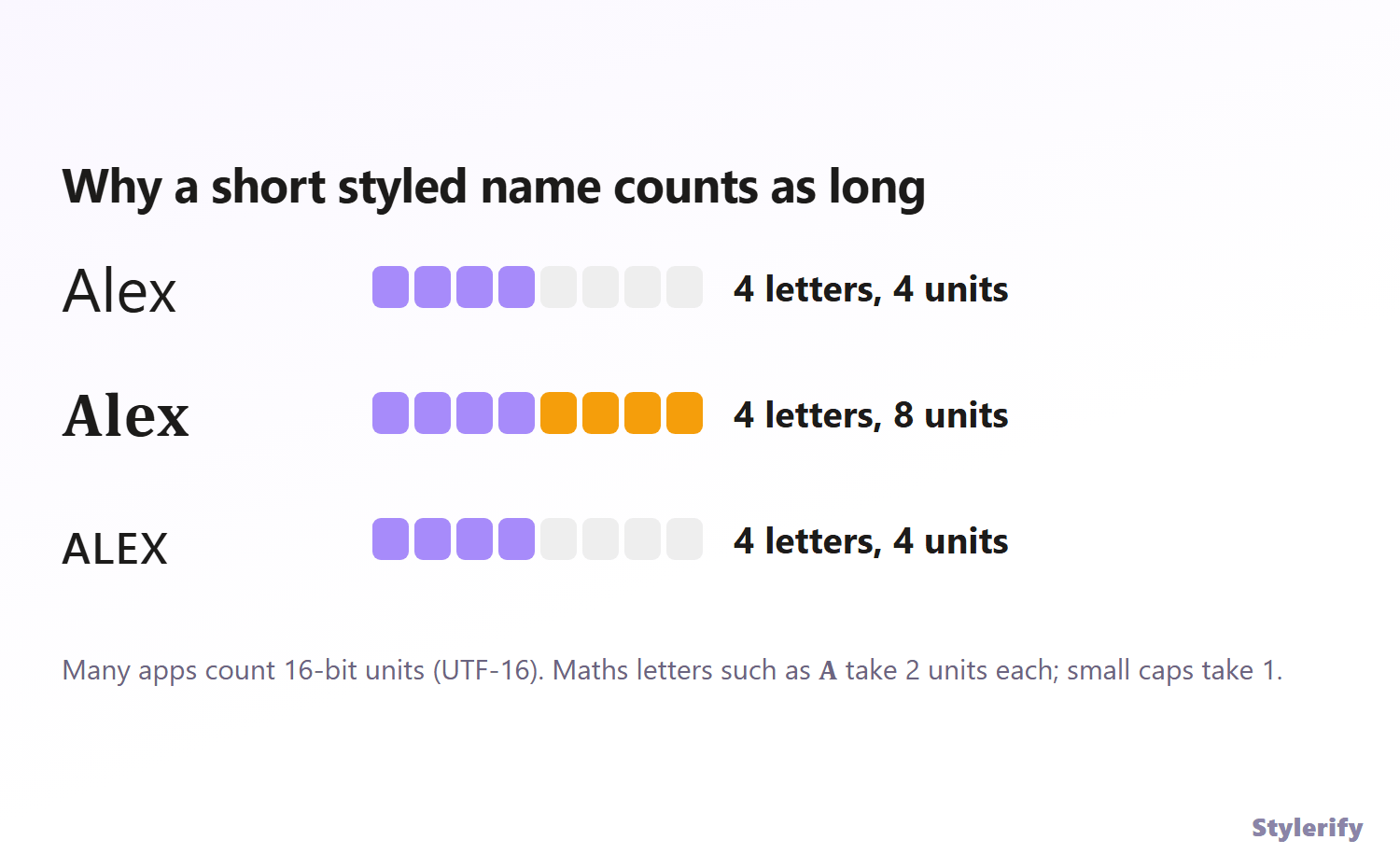
A name can look short and still be "too long" when the app counts storage units instead of visible letters. Many apps measure text in 16-bit units of the Unicode Transformation Format (UTF-16), where an ordinary letter takes one unit and a mathematical letter takes 2. 𝐀𝐥𝐞𝐱 is 4 letters to your eye and 8 units to such an app. Full-width and small-caps letters take one unit each, which is why switching to small caps often gets a name under a limit.
Source: Mozilla developer docs, String length; Unicode encoding questions.
4 Situations, 4 Different Next Checks
"My name is broken" covers 4 different situations, and each one needs its own next step.
| Situation | Where the problem is | Next check |
|---|---|---|
| Boxes in the generator itself | Your device lacks the font | Try the name on another device; pick a style without a warning badge |
| Fine in the generator, wrong after pasting | The paste, or the app's display | Paste into a notes app; copy the whole name again in one go |
| The game refuses it | The game's character rules | Remove characters one at a time; read the game's rules |
| Fine for you, boxes for other players | The other players' devices | Swap the rare symbol for a common one; you cannot change their fonts |
For the rename screens themselves, see how to change your name in Free Fire and FF MAX and how to change your name in PUBG Mobile and BGMI.
What Game Rules Say About Special Characters
Game rules decide what a name may hold, and most games publish less than players expect:
- Free Fire. Garena's support article advises against special characters in a new nickname and says it cannot guarantee they all appear, given how devices are set up.
- PUBG on PC. PUBG's support page allows only letters, numbers, hyphens and underscores in a player name. That page covers the PC game; PUBG Mobile publishes no such list.
- Roblox. Display names accept Japanese characters in a beta, with more scripts planned, and names that break the community rules may be reset.
When a game says nothing, its rename screen is the only test, and some games charge for that screen. Prepare the name with the checks above before you spend anything.
Sources: Garena Free Fire support; PUBG support (PC); Roblox display names.
Practical Name Check: Narrow Down the Problem
✓ Practical name check⏱ about 4 minutes
Goal: find out whether your name breaks on your device, in the copy, or only in the game, using a plain baseline and 2 decorated versions.
- Open the generator with the button below and type a short name, such as Nova.
- Copy 3 versions: plain Nova, one style with a single common symbol such as ✦ ɴᴏᴠᴀ ✦, and the decorated version you actually want.
- Paste all 3 on separate lines in a notes app, then send them to a second device.
- Paste the decorated version into the Name Checker to list its characters.
- Paste the versions into the game's name preview only where it costs nothing, and stop before any paid confirmation.
Success check: you know which of the 3 versions breaks, and on which device or screen, so you know which row of the symptom table applies.
When it fails: a plain Nova that fails as well means the field or game is the problem; contact the game's support rather than changing styles.
A text check on this site or in another app shows how the characters look. It cannot show whether a game's server will accept the name.
What Does Not Fix the Problem
Some common advice wastes time or creates new problems:
- Changing your phone's display font. It changes only your own screen, and other players still use their own fonts.
- Copying the same text again and again. An unsupported character stays unsupported: a fresh copy carries the same character.
- Installing an unknown "font keyboard". It types the same Unicode characters a website gives you, and keyboards can see what you type, passwords included.
- Assuming every decorative character counts as one. Styled letters can count as 2, and some symbols are built from several characters.
- Using invisible characters to hide part of a name. Apps drop them, and using them to copy another player's name breaks most games' rules.
For entering symbols cleanly on each device, see how to type stylish symbols on Android, iPhone and PC.
Styled Names and Screen Readers
Screen readers read styled letters by their Unicode names or skip them, so 𝓝𝓸𝓿𝓪 can come out as a string of "mathematical bold script capital N" phrases, or as nothing at all. The World Wide Web Consortium (W3C) MathML guidance gives this as a reason not to use mathematical letters for styled prose. For a teammate who uses a screen reader, a plain name with one symbol reads far better.
Source: W3C MathML, chapter 7.
Frequently Asked Questions
Why does my name show boxes on one phone but not on another?
Why did a character turn into a question mark?
Why did my symbols vanish after I saved the name?
Will changing my phone's font fix the boxes?
Do games support every Unicode character?
Drop any character that keeps failing after these checks. A readable name in plain letters with one common symbol, such as ✦ Nova ✦, shows on nearly every device and passes most game filters, and you can add more decoration later once you know what your game keeps.